pod install 경고 CocoaPods 설정과 Xcode 빌드 설정 충돌
pod install 하면 종종 만나는 아래와 같은 경고
[!] The `mygame-desktop [Debug]` target overrides the `GCC_PREPROCESSOR_DEFINITIONS`
build setting defined in `Pods/Target Support Files/Pods-mygame-desktop/Pods-mygame-desktop.debug.xcconfig'.
This can lead to problems with the CocoaPods installation

    - Use the `$(inherited)` flag, or
    - Remove the build settings from the target.
CocoaPods 설정 파일과 Xcode 프로젝트의 빌드 설정 간에 충돌이 발생했다는 이야기
$(inherited) 플래그를 추가하여 해결해 줍니다.
$(inherited) 플래그 추가하기
$(inherited) 플래그를 사용하면 상위 설정(예: CocoaPods에서 제공하는 설정)을 포함할 수 있습니다.
- Xcode에서 프로젝트를 엽니다.
- Targets > mygame-desktop > Build Settings로 이동합니다.
- GCC_PREPROCESSOR_DEFINITIONS를 검색합니다.
- $(inherited)를 추가합니다.
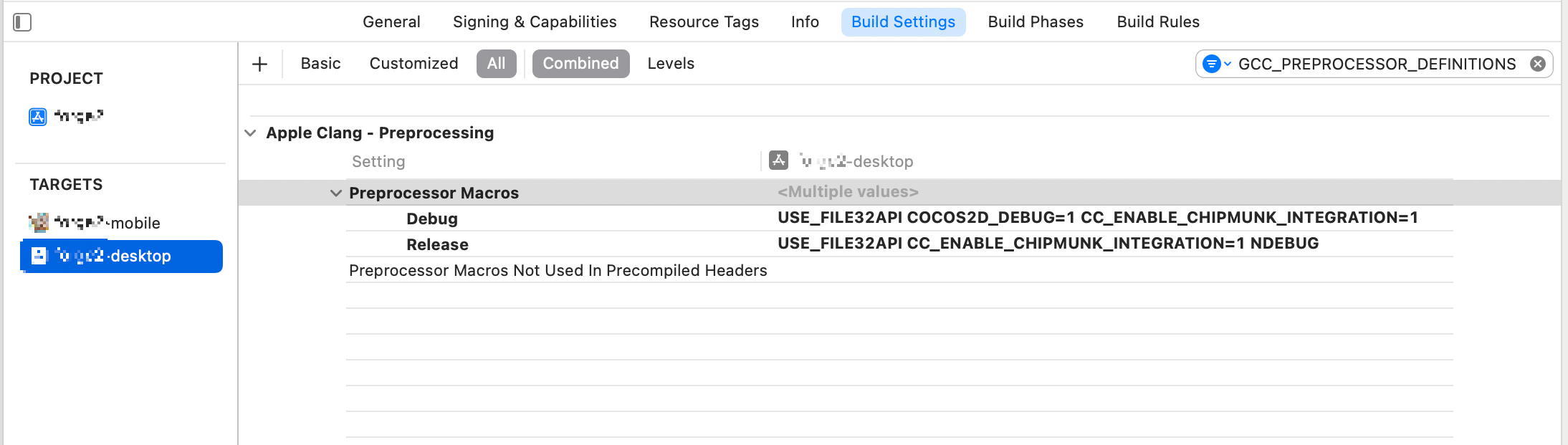
아래와 같이 $(inherited) 플래그를 추가해 주면 경고가 없어집니다.

반응형
'iOS' 카테고리의 다른 글
| iOS 앱 다국어 언어 지원 기본언어 설정 (0) | 2025.02.11 |
|---|---|
| iOS 시뮬레이터 갤러리 사진 경로 (0) | 2025.01.08 |
| iOS 앱스토어 수출 규정 관련 문서 누락 해결 방법 (0) | 2024.12.18 |
| cocos2d-x 3.17.2 새 프로젝트 만들었을때 iOS 에러 고치기 (2) | 2024.11.29 |
| iOS 에러 Cannot create __weak reference in file using manual reference counting (0) | 2021.10.21 |


